
Ghostface AI generator
Reimagine your photo as a staged Y2K phone scene: you in the foreground, a masked figure in the doorway. Edit the full prompt and create a photo below.
Vikas Editor studio
AI-generated style concepts, not before-and-after tests of this editor.
Checking studio availability…
Your latest 20 edits, including unfinished requests. Sign in to view them.
The phone portrait, with you still in the frame
The Ghostface AI photo look combines a corded phone, a softly lit bedroom, direct flash and a costumed figure behind an unmasked subject. Start with this composition and change the room, outfit or lighting. It creates a still image from your photo for a fictional Halloween portrait, mood board or AI-labeled social post.
AI-generated style concepts, not before-and-after tests of this editor.
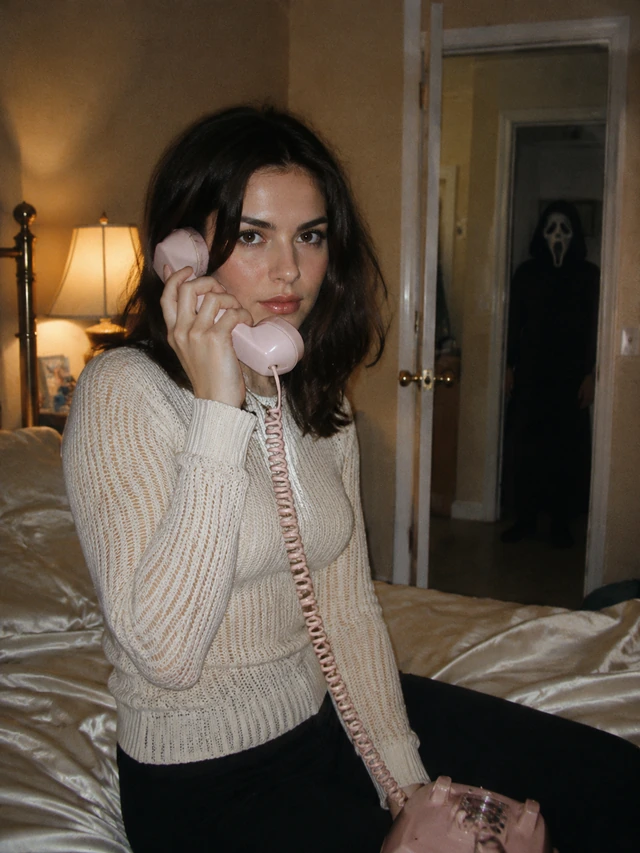
Y2K phone scene
A cream outfit, satin bedding and a pale corded phone establish the foreground. A smaller black-hooded figure with a white mask stands in the distant doorway. The prompt keeps the scene staged and non-graphic, with no weapon, injury or contact. This is a style concept, not a real event.
Create a Ghostface photo with a visible scene prompt
- 01
Use a clear portrait
For the phone scene, add a single portrait file (JPG, PNG or WebP; maximum 15 MiB). A face that is visible and well lit gives you a better reference to compare against. A seated or waist-up portrait is a practical start for the composition. Avoid a source that already covers your face with a mask.
- 02
Review the phone-scene instructions
Check the preloaded phone scene under Edit full prompt. Change the outfit, room or light to suit your picture. Keep the masked figure separate from the foreground subject. You can simplify the handheld prop if your source has a different pose, and choose a framing that leaves space for the doorway.
- 03
Generate and inspect the result
Sign in, confirm your right to use the image and check the credit cost. Generate the photo, then inspect your face, the phone, fingers and the background figure. After a task succeeds, save the image with Download; you can also reopen the task in history. If the composition is wrong, change one instruction rather than adding more competing objects.
A Ghostface AI prompt needs clear spatial instructions
“Add Ghostface” can mean putting a mask on the main subject or introducing a second character. State who stays in front, who appears behind and how far apart they should be. Keep one clear focal point. Mention a staged movie portrait if you want atmosphere without a graphic scene.
Change one visual choice at a time: the chair, telephone color or flash. Specify your original clothing and pose if they matter. Keep the background figure smaller than the subject with a visible doorway between them.
Edit this photo into a staged Y2K horror phone portrait. Preserve my recognizable face, skin tone and apparent age. Keep my face visible while I hold a vintage corded telephone. Use warm bedside light and direct flash. Place a small Ghostface-costumed figure in the distant doorway, separate from me. No weapon, blood, injury, contact, text or watermark.
Fix the scene before adding more effects
- The mask ends up on my face
- Say that the foreground subject remains unmasked with their face fully visible. Describe the costumed figure as a separate, small background character in the doorway. Remove phrases such as “turn me into Ghostface” if you want the phone portrait.
- The masked figure is too close
- Specify a distant doorway and visible separation from the main subject. Ask for a smaller background silhouette and no contact. A wider composition may help show the room, but review facial detail after changing the framing.
- The phone or fingers are distorted
- Keep the prop simple: one corded handset beside the ear and a natural grip. If that conflicts with the source pose, request the phone on a bedside table instead. Do not stack a drink, mirror selfie and multiple hand gestures into the same edit.
Choose the portrait you want to make
A fictional Halloween profile photo
Keep the foreground face large enough to recognize after cropping. A doorway figure may disappear in a small avatar, so compare a cropped version before choosing your result. Share the image as an AI-created scene and avoid presenting a fictional encounter as a real photograph.
A retro horror concept image
Explore room colors, wardrobe and lighting for a mood board. Keep the cream-and-charcoal composition for a quieter look, or request a different background. This page creates a still photo; motion, soundtrack and a complete short film require a separate workflow.
What this generator does, and what to check
View credit packsThe current photo edit costs 10 credits per generation. Your available balance and the server cost appear in the tool before submission. Selecting the preset, uploading a source and editing the prompt do not spend credits. Sign in and use sufficient credits when you are ready to generate. To buy credits, see the available packs on Pricing.
The Ghostface AI generator takes one source image and produces a new photo edit. It does not replace a person inside an uploaded video, combine separate face references or guarantee exact likeness. AI may alter facial details and props. Processing uses an external AI service; upload only photos you have permission to use. The example is a separately generated style illustration, not a verified before-and-after result from this tool.
Ghostface photo questions
What is the Ghostface AI photo trend?
It is a staged horror-photo style featuring a Y2K bedroom, corded telephone and masked background figure. Some variations put a costume on the subject. This page keeps your foreground face visible.
How do I keep Ghostface behind me?
Describe a separate, smaller character in a distant doorway and keep your own face unmasked. Check the result because spatial instructions can be misinterpreted. Simplify the room and props if needed.
Will this preserve my exact face?
The preset requests recognizable features, skin tone and apparent age; exact likeness is not guaranteed. Use a clear source and compare carefully. Retain your pose and simplify wardrobe changes when likeness matters most.
Can I create a Ghostface video here?
This page creates a still photo. The homepage has a separate image-to-video mode that starts from an image. It does not accept a reference video and replace the person inside it. Creating this photo and requesting a video are separate generation tasks with separate credit costs.
Is the Ghostface AI generator free?
Browsing and editing prompts do not spend credits. Photo generation currently requires 10 credits and a signed-in account with sufficient balance. Check the tool before submitting. Unlimited free generations and first-attempt success are not promised.
Can I change the scene and download the result?
Yes. Edit the room, clothing, phone color or light in the prompt, then generate. Download is available when a task succeeds, including through your history. The tool does not automatically publish to social media. Save the image locally and inspect it before using it in a post or project.
Put the scene around your portrait
Start with the phone preset, keep your face visible, and make the background instructions clear.