
Polaroid AI Photo Generator
Give one uploaded photograph an instant-film look. Choose a solo or existing couple photo, adjust the flash and grain, then download one generated image.
Vikas Editor studio
AI-generated style concepts, not before-and-after tests of this editor.
Checking studio availability…
Your latest 20 edits, including unfinished requests. Sign in to view them.
One photograph, styled as one instant print
The Polaroid AI photo generator creates a digital instant-film effect: a white paper border around a photograph with direct flash, softened color and restrained grain. Vikas Editor uses a single source image and an editable prompt. It can restyle an existing couple photograph, but it cannot combine two separate selfies or place you beside a person absent from the source.
AI-generated style concepts, not before-and-after tests of this editor.
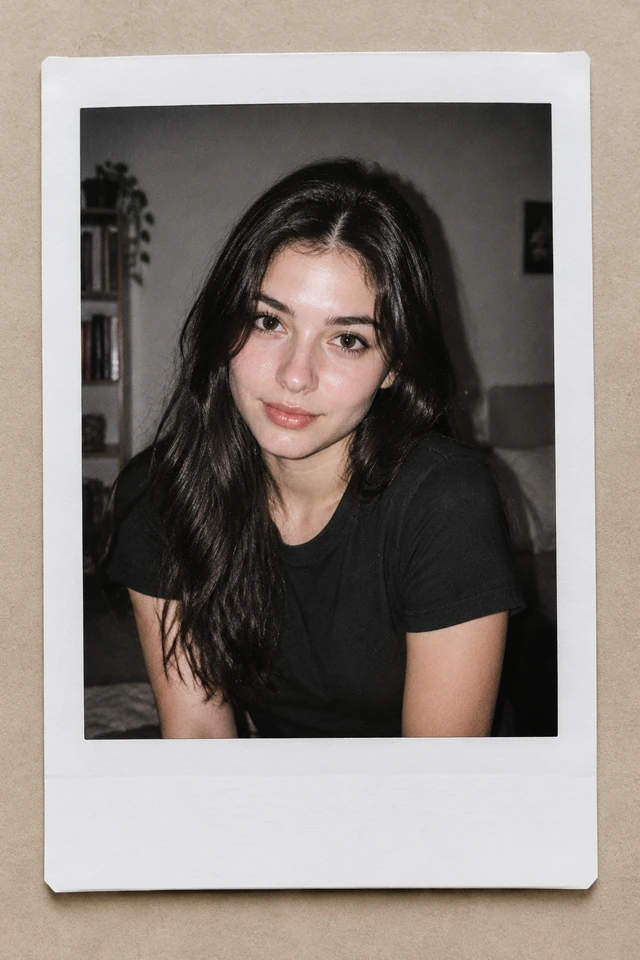
A candid solo print
Use the direct-flash look for an everyday portrait with a quiet interior setting. The preset asks to retain your clothing, hairstyle and expression while changing the photographic treatment. A slightly darker background makes the flash feel believable. Keep the white border blank for a cleaner result. The aim is a digital print-like composition; no physical camera or paper is included.
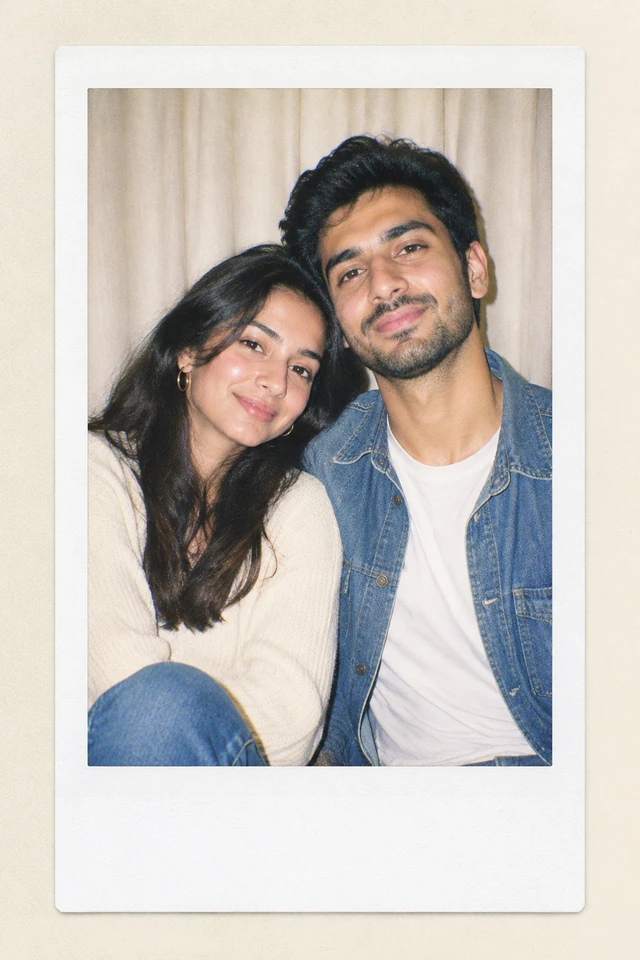
An existing couple or group photo
Choose a source that already shows the people together. The couple preset requests a simple curtain backdrop, faded color and one paper border around the image. Faces should remain individually recognizable, though results need checking. For a solo source, it makes a solo print rather than inventing a partner.
Make an instant-film portrait online
- 01
Upload a photograph, not a collage
Choose one JPG, PNG or WebP up to 15 MiB. Leave space around heads and shoulders so a border does not feel cramped. If the file already contains a thick frame, start from the unframed original when possible. Avoid screenshots with several pictures, interface controls or captions, because the editor may interpret those as part of the scene.
- 02
Choose the print treatment
Select the solo or couple look and open Edit full prompt. Keep the original people and state whether you want the clothing and pose unchanged. Adjust flash strength, faded color or grain. Choose the output composition before generating. It describes the canvas you request; it is not a physical instant-film paper size or a guarantee of exact border measurements.
- 03
Inspect the border and the faces
Sign in, confirm permission and check the 10-credit image cost. When generation finishes, look at the corners, lower margin, hands and face detail. Download a version you like before moving to another edit. For a gentler treatment, reduce grain or flash in the prompt and make a new request. Each generation has its own credit charge.
Describe the film look without changing the memory
A focused instant-film prompt can retain the scene’s people and expression while asking for paper and color changes. Separate those intentions clearly.
Edit the details you care about. Keep your existing background if it is part of the memory, or request a plain curtain for a studio-like result. Do not ask simultaneously for a single print and a collage; those are different compositions and need different decisions.
Keep the people, clothing, pose and expressions from this photograph. Present the image as one instant-film print with a plain white border and a slightly deeper blank lower margin. Use modest direct flash, warm faded color and fine grain. Keep faces clear. Do not add another print, handwriting, a date stamp or a new person.
Fix the print effect before sharing
- A second print or collage appears
- Remove references to albums, stacks or photo walls. Ask for one print containing the entire source scene. If your upload already contains several frames, replace it with a single photograph before requesting another generation.
- The border is uneven or clipped
- Ask for all four paper edges inside the canvas and a modest, uniform border. Choose framing that leaves space around the print. Generated geometry can vary, so use a separate layout editor if you require exact measurements for a design.
- The face loses detail under the grain
- Reduce grain and ask for clear eyes and natural skin. Avoid combining heavy blur, faded exposure and strong flash. A sharp source allows you to judge whether the film effect is subtle enough for your intended viewing size.
Ways to use a digital instant print
A small digital keepsake
Use the image in a personal message, profile or digital album where an informal snapshot feels appropriate. If you want a date or note, add it after download with a text editor so wording and alignment remain dependable.
A shared photograph with a new mood
Restyle a photograph of friends or a couple that already exists. Keep the familiar pose and request a simple treatment rather than inventing an embrace. This is useful when you want an album-like look from one moment; it is not a reconstruction of an event that was never photographed.
What this photo effect can change
View credit packsThis is a generated photo effect rather than a precise image-processing filter. Lighting, facial detail, clothing or paper proportions may shift even when the prompt asks to preserve them. Inspect the finished file before using it. Original previews show intended looks and are not customer before-and-after examples.
Browsing and adjusting a template do not consume credits. Creating the image requires an account, one source photograph and 10 credits. Instructions have a 1,000-character limit. Vikas Editor is independent and is not affiliated with Polaroid. Read the privacy policy before uploading personal images; this is an online generation service.
Instant-film photo questions
Can this combine two separate photos?
No. The current tool accepts one source photograph per request. Use an existing joint photograph for the couple look. Combining independent selfies needs a different workflow.
Can I make a picture with my younger self?
This page does not offer two-photo identity merging. It should not be used as a promise to combine your current portrait with a separate childhood photograph.
Will it preserve my clothes and expression?
The presets request that, but image generation can alter details. Review the result carefully. Reduce the scope of the edit if only a border and subtle color change are needed.
Is this connected to a Polaroid camera?
No. The output is a downloadable digital image with an instant-film-inspired appearance. It is not a camera connection, a physical print or an official Polaroid service.
Can I choose the border color?
You can request another color in the full prompt. Keep the instruction consistent and check all four edges. Exact pixel dimensions and print-ready margins need a separate layout workflow.
What does another version cost?
Every image generation uses 10 credits. Selecting a preset or rewriting the instruction is free to do; the charge applies when you submit a generation request.
Try a quieter film treatment
Start with a photograph you like, then choose the flash, color and paper details that suit it.